How Google Ads Can Generate Instant Leads for Your Business
Google Ads is one of the fastest ways to generate instant leads for your business because it places your offer directly in front of people who are actively searching for your products or services. Unlike SEO, which takes time to rank organically, Google Ads allows businesses to appear at the top of search results immediately. With the right keyword targeting, ad copy, landing pages, and conversion tracking, businesses can start receiving calls, form submissions, and inquiries within hours of launching a campaign. When managed strategically, Google Ads delivers measurable ROI, scalable growth, and consistent lead flow.
Introduction
In today’s competitive digital landscape, businesses cannot afford to wait months for leads. Whether you are a startup in Srinagar, a service provider in Delhi, or a company targeting the USA or Canada, you need results — and you need them fast.
This is where Google Ads becomes a game-changer.
As a Google Ads expert based in Srinagar, I’ve helped businesses across India, USA, Singapore, Malaysia, and Canada generate consistent and high-quality leads through strategic paid campaigns.
Let’s break down how Google Ads can generate instant leads for your business and how you can use it effectively.
What Is Google Ads?
Google Ads (formerly Google AdWords) is an online advertising platform where businesses pay to display ads on Google’s search engine and partner websites.
When someone searches for:
- “SEO services near me”
- “Best digital marketing expert in Srinagar”
- “Plumber in Delhi”
- “Google Ads agency USA”
Your ad can appear at the top of search results instantly.
That means your business is shown to people who are already interested.
And that’s powerful.
Why Google Ads Generates Instant Leads
1️⃣ Immediate Visibility
SEO can take 3–6 months to show results.
Google Ads? You can start generating leads the same day your campaign goes live.
Once approved:
- Your ad appears on page 1
- Above organic results
- In front of high-intent users
2️⃣ High Buyer Intent Targeting
Google Ads works based on keywords. This means you target users who are already searching for your service.
Example:
If someone searches:
“Google Ads expert in Maharashtra”
That person is ready to hire.
You are not interrupting them — you are helping them.
This is why conversion rates in search campaigns are typically higher than social media ads.
3️⃣ Pay Only for Results
With Google Ads:
- You pay only when someone clicks.
- Not for impressions.
- Not for views.
This makes it cost-effective.
With proper optimization, your Cost Per Lead (CPL) decreases over time.
Types of Google Ads That Generate Leads
🔍 1. Search Ads (Best for Instant Leads)
These appear on Google search results when someone types a query.
Best for:
- Service-based businesses
- Local businesses
- Consultants
- Agencies
📞 2. Call-Only Ads
Perfect for:
- Local services
- Emergency services
- Clinics
- Contractors
Users tap and call directly.
No website needed.
🗺 3. Local Service Ads
Great for businesses targeting specific cities like:
- Srinagar
- Delhi
- Karnataka
- Maharashtra
These ads show above search ads with trust badges and reviews.
📺 4. Display & YouTube Ads
Best for:
- Brand awareness
- Retargeting
- Remarketing campaigns
Not always instant — but powerful for scaling.
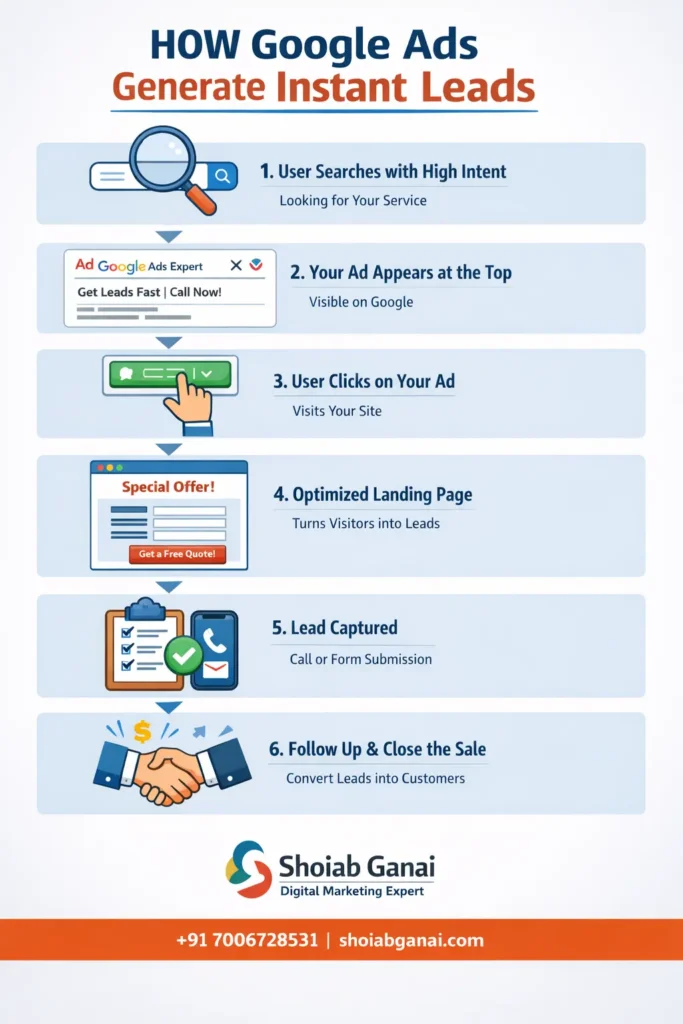
Step-by-Step Process- How Google Ads Can Generate Instant Leads
Step 1: Keyword Research
Focus on:
- High-intent keywords
- Location-based keywords
- Service-specific keywords
Example:
- “SEO expert in Delhi”
- “Google Ads consultant USA”
- “Local SEO services in Srinagar”
Avoid broad keywords like:
- “marketing”
- “digital”
Step 2: Write High-Converting Ad Copy
Your ad must include:
- Main keyword
- Clear benefit
- Strong call-to-action
- Location (if local)
Example:
Headline:
“Google Ads Expert in Srinagar | Get Leads Fast”
Description:
“Generate instant leads with ROI-focused Google Ads campaigns. Call now for free consultation.”
Step 3: Create a High-Converting Landing Page
Your landing page must include:
✔ Clear headline
✔ Service benefits
✔ Trust signals
✔ Testimonials
✔ Contact form
✔ Call button
✔ Fast loading speed
Most campaigns fail because of poor landing pages — not ads.
Step 4: Conversion Tracking Setup
Without tracking:
You are guessing.
With tracking:
You are scaling.
Track:
- Form submissions
- Calls
- WhatsApp clicks
- Purchases
This helps optimize for real leads, not just clicks.
Step 5: Optimize & Scale
Once leads start coming:
- Pause low-performing keywords
- Increase budget on converting keywords
- Test new ad copies
- Improve landing page
Optimization reduces cost and increases ROI.
Real Example: How Google Ads Generates Leads Fast
Let’s say you run:
“Digital Marketing Services in Karnataka”
You launch:
- Search campaign
- Target Karnataka
- Use high-intent keywords
- Add call extension
Within hours:
✔ Calls start coming
✔ Form submissions increase
✔ Qualified leads generated
This is the power of demand-based advertising.
Benefits of Google Ads for Businesses
🚀 Fast Results
No waiting months.
🎯 Laser Targeting
Target by:
- Location
- Device
- Age
- Income
- Time of day
📊 Measurable ROI
Track every click and conversion.
🌍 Global Reach
You can target:
- USA
- Canada
- Singapore
- Malaysia
While operating from India.
Google Ads vs SEO – Which Is Better?
| Factor | Google Ads | SEO |
|---|---|---|
| Speed | Instant | Slow |
| Cost | Paid | Organic |
| Scalability | High | Medium |
| Long-Term | Short/Medium | Long-Term |
Best strategy?
Use both together.
SEO builds foundation.
Google Ads brings instant leads.
Common Mistakes That Kill Lead Generation
❌ Targeting broad keywords
❌ Not using negative keywords
❌ Sending traffic to homepage
❌ No tracking setup
❌ Poor ad copy
❌ No follow-up system
Avoid these — and your campaigns will perform better.
Who Should Use Google Ads?
✔ Local service providers
✔ Agencies
✔ Real estate companies
✔ Doctors & clinics
✔ Education institutes
✔ Travel agencies
✔ E-commerce brands
If your customers search on Google, you need Google Ads.
Why Hire a Google Ads Expert?
Running ads is easy.
Running profitable ads is not.
A professional expert helps with:
- Keyword research
- Budget management
- Ad copywriting
- Conversion optimization
- A/B testing
- Scaling strategy
If you want consistent leads without wasting budget, expert management is essential.
How Shoiab Ganai Helps Businesses Generate Leads
As a Google Ads expert based in Srinagar, I provide:
✔ ROI-focused Google Ads strategy
✔ Campaign setup & optimization
✔ Lead tracking implementation
✔ Landing page consultation
✔ International campaign management
I’ve worked with clients in:
- India
- USA
- Canada
- Singapore
- Malaysia
If you want instant leads, strategic Google Ads management can transform your business growth.
FAQs for How Google Ads Can Generate Instant Leads
1. How fast can Google Ads generate leads?
You can start receiving leads within hours of launching a properly optimized campaign.
2. What budget is required to start?
It depends on your industry and location. Most service businesses can start with a moderate daily budget and scale based on performance.
3. Is Google Ads better than Facebook Ads?
Google Ads targets high-intent users actively searching. Facebook Ads are better for awareness and retargeting. Both work well together.
4. How do I reduce cost per lead?
Use:
- Negative keywords
- Conversion tracking
- Ad testing
- Landing page optimization
5. Can I target international clients?
Yes. You can run campaigns targeting USA, Canada, Singapore, Malaysia, and more.
Final Thoughts for How Google Ads Can Generate Instant Leads
If you want:
✔ Instant visibility
✔ Qualified leads
✔ Measurable ROI
✔ Scalable growth
Google Ads is one of the most powerful tools available.
When executed correctly, it can transform your business within weeks.
If you’re ready to generate consistent, high-quality leads, professional Google Ads management can help you achieve your goals faster.
5 working external reference links
- Google Ads Lead Generation (official guide) – Learn how Google Ads helps businesses generate leads by reaching the right customers at the right time. Google Ads: Generate leads with Google Ads (Support Guide) (Google Help)
- Google Ads Lead Gen Best Practices – Best practices from Google for generating high-quality leads using campaign goals optimized for lead generation. Best practices for generating high‑quality leads (Google Ads) (Google Help)
- Lead Generation Framework & Strategies – A step-by-step framework to structure Google Ads campaigns for better lead generation results. Google Ads for lead generation: A 6‑step framework (Search Engine Land) (Search Engine Land)
- Practical Strategies to Generate More Leads – Actionable tactics to optimize Google Ads for attracting and converting quality leads. 10 Effective Ways to Generate Leads with Google Ads (Blueprint Digital) (blueprintdigital.com)
- Google Ads Local Lead Generation Tips – Tips for local businesses to maximize their lead generation potential with Google’s ad solutions. Guide to lead generation for local businesses – Google Ads (business.google.com)