
How to Rank Your Business on Google Maps in 30 Days
Ranking your business on Google Maps in 30 days requires a focused local SEO strategy built around optimizing your Google Business Profile, generating consistent customer reviews, improving engagement signals, and strengthening local authority. In the first week, fully optimize your profile with accurate categories, services, keywords, and complete business details. In the second week, actively collect and respond to reviews while adding high-quality photos to boost trust and interaction. During the third week, build citations and local backlinks to increase credibility and prominence. In the final week, enhance your website with location-based SEO, embed Google Maps, publish local content, and track performance metrics like calls, clicks, and rankings. Consistency, authenticity, and engagement are the key factors that help improve visibility and move your business into the top Google Maps results.
What Is Google Maps Ranking?
Google Maps rankings are controlled by an algorithm from Google that evaluates businesses based on three main factors:
- Relevance – How well your profile matches the search
- Distance – How close you are to the searcher
- Prominence – How popular and trusted your business is
You can’t control distance — but you CAN control relevance and prominence.
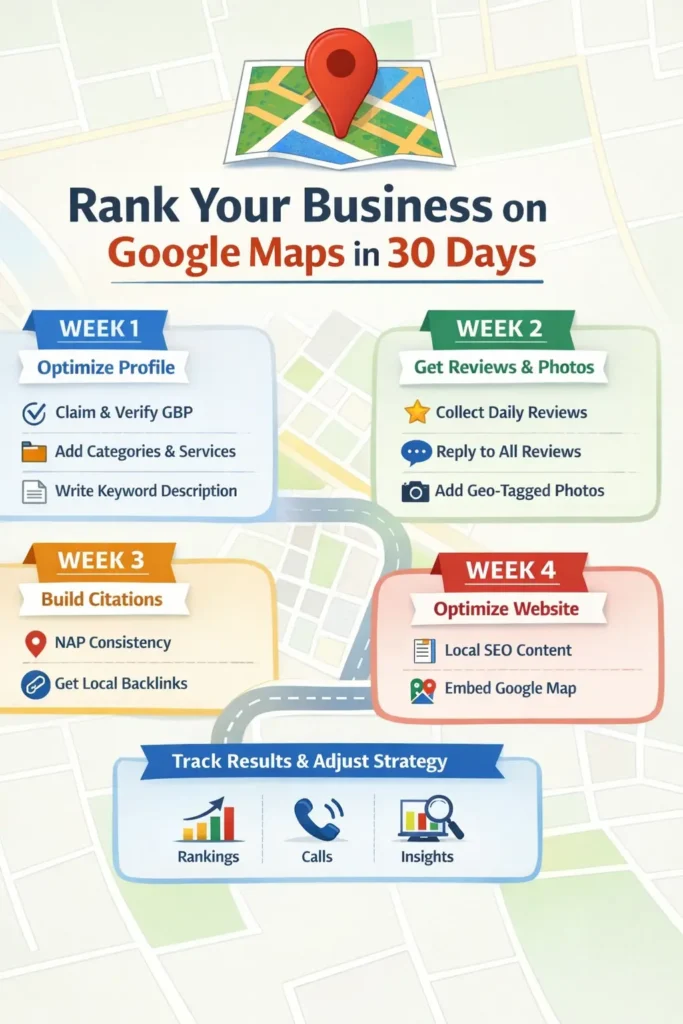
Week 1: Optimize Your Google Business Profile (Foundation Phase)
Your Google Business Profile (GBP) is the #1 ranking factor.
Step 1: Claim and Verify Your Profile
If you haven’t claimed it yet:
- Search your business name
- Claim ownership
- Complete verification
Unverified businesses struggle to rank.
Step 2: Optimize Every Section
✅ Business Name
Use your real business name. Avoid keyword stuffing.
✅ Primary Category
Choose the most accurate category (this is critical).
Example:
- Dentist
- Travel Agency
- Restaurant
- Real Estate Agent
✅ Secondary Categories
Add related services.
✅ Description
Write 750 characters including:
- Main service
- Location
- Unique selling point
- Call to action
Example:
“We are a leading digital marketing agency in Mumbai offering SEO, Google Ads, and website design services.”
Step 3: Add Services & Products
List all services individually.
Each service should include:
- Keyword
- Description
- Pricing (if possible)
This increases relevance signals.
Week 2: Reviews & Engagement Strategy
Reviews are the strongest trust signal for Google Maps ranking.
Step 4: Get 15–25 Reviews in 30 Days
Goal: 1 review per day.
How?
- Send WhatsApp review link
- Ask after service completion
- Create QR code for reviews
- Offer polite reminders
Step 5: Respond to Every Review
Google tracks engagement.
When replying:
- Mention your service
- Mention your location
- Use natural keywords
Example:
“Thank you for choosing our plumbing services in Andheri. We’re glad we could fix your issue quickly!”
Step 6: Upload Photos Weekly
Businesses with photos get more clicks.
Upload:
- Office images
- Team photos
- Service images
- Customer interactions
- Before/after photos
Add 3–5 photos every week.
Week 3: Authority Building Phase
Now we build prominence.
Step 7: NAP Consistency (Critical)
NAP = Name, Address, Phone Number
Your details must match exactly across:
- Justdial
- IndiaMART
- Sulekha
- Bing Places
- Local directories
Even small differences hurt rankings.
Step 8: Build Local Citations
Submit your business to:
- Local business directories
- Industry directories
- Chamber of commerce websites
- Startup listing platforms
More citations = more trust.
Step 9: Get Local Backlinks
Backlinks improve prominence.
Ways to get them:
- Guest blogging
- Partner with local businesses
- Sponsor local events
- Publish press releases
- Collaborate with influencers
Even 5–10 quality backlinks can boost rankings significantly.
Week 4: Website & Local SEO Optimization
Your website supports your Google Maps ranking.
Step 10: Optimize Homepage for Location
Include:
- City name in title
- H1 with service + location
- Embedded Google Map
- Contact details in footer
- Schema markup
Example Title:
“Best Interior Designer in Delhi | Modern Home Designs”
Step 11: Create Location Pages
If you serve multiple areas, create pages like:
- Plumber in South Delhi
- Electrician in Noida
- SEO Agency in Mumbai
Each page should:
- Have 800+ words
- Include testimonials
- Add local keywords naturally
Step 12: Publish Local Blog Content
Content ideas:
- “Best Time to Visit Kashmir”
- “Top 10 Cafes in Bandra”
- “Complete Guide to Home Renovation in Pune”
Local content increases relevance.
Advanced Google Maps Ranking Tips
🔥 Use Google Posts Weekly
Post:
- Offers
- Updates
- New services
- Events
Google likes active businesses.
🔥 Enable Messaging
Quick response rate improves engagement signals.
🔥 Improve CTR (Click-Through Rate)
Ways:
- Attractive business photos
- 5-star ratings
- Strong description
- Consistent updates
30-Day Action Plan Summary
| Week | Focus | Goal |
|---|---|---|
| Week 1 | Profile Optimization | Fully optimized GBP |
| Week 2 | Reviews & Photos | 15–25 reviews |
| Week 3 | Citations & Backlinks | 20+ listings |
| Week 4 | Website & Content | Location authority |
Common Mistakes to Avoid
❌ Keyword stuffing business name
❌ Fake reviews
❌ Inconsistent phone numbers
❌ Ignoring negative reviews
❌ No website optimization
❌ No regular updates
How Long Does It Take to Rank?
If your competition is low to medium:
- You can see improvement within 2–4 weeks.
If competition is high:
- 60–90 days may be required.
Consistency is the key.
FAQs
1. Can I rank on Google Maps without a website?
Yes, but having a website increases authority and ranking speed.
2. How many reviews do I need to rank?
There’s no fixed number, but aim for more reviews than your top 3 competitors.
3. Do keywords in business name help?
Yes, but adding fake keywords violates guidelines and may cause suspension.
4. How often should I post on Google Business Profile?
At least once per week.
5. What is the fastest way to rank?
Optimize profile + get consistent reviews + build citations quickly.
Final Thoughts
Ranking your business on Google Maps in 30 days is realistic — if you follow a structured plan.
Focus on:
- Complete optimization
- Review growth
- Local authority building
- Website support
- Consistent engagement
Local SEO isn’t about tricks. It’s about trust signals.
If you apply these steps consistently for 30 days, you’ll see measurable improvement in visibility, calls, and leads.

Related Posts