
Why Your Google Ads Campaign Is Not Converting | Fix Low Conversion Issues
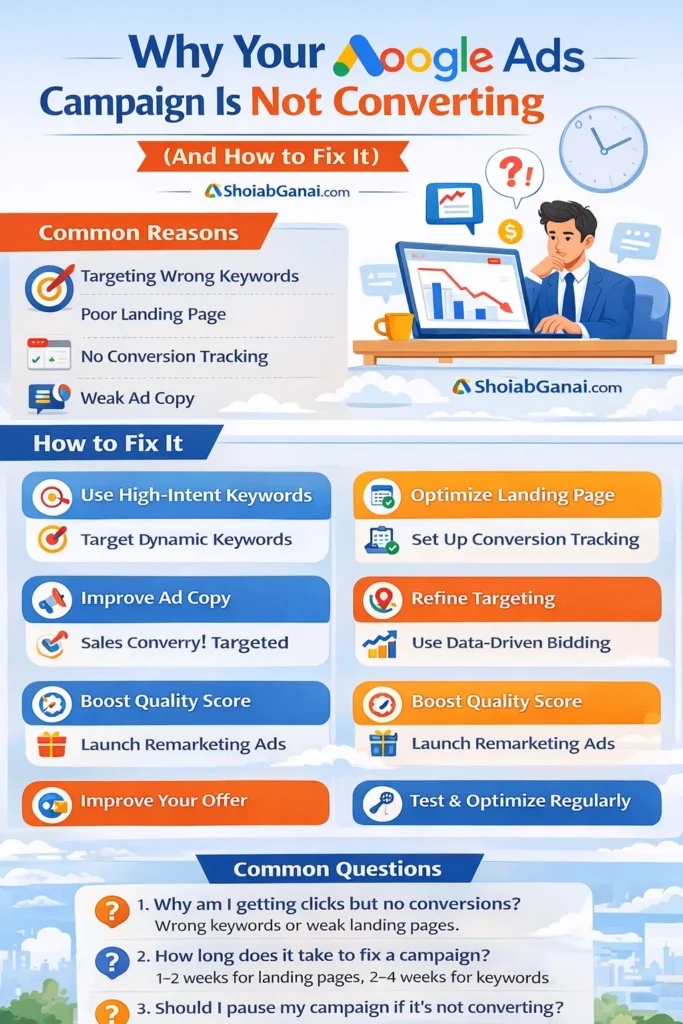
If your Google Ads campaign is not converting, the most common causes include wrong keyword targeting, poor landing page experience, weak ad copy, lack of conversion tracking, incorrect bidding strategy, or targeting the wrong audience.
To fix low conversion rates, you need to:
- Optimize keyword intent
- Improve landing page relevance
- Strengthen call-to-actions
- Set up accurate conversion tracking
- Use data-driven bidding strategies
- Continuously test and refine campaigns
Google Ads success is not about getting more clicks — it’s about attracting the right clicks and converting them effectively.
Introduction
You’re spending money on Google Ads.
You’re getting clicks.
But you’re not getting leads or sales.
Sound familiar?
Many businesses invest in Google Ads expecting instant results — but when conversions don’t come in, frustration builds quickly. The problem is rarely Google Ads itself. Instead, it’s usually issues with targeting, strategy, landing pages, tracking, or optimization.
If your Google Ads campaign is not converting, don’t panic. In this detailed guide, you’ll discover:
- The most common reasons campaigns fail
- How to diagnose performance issues
- Step-by-step fixes to improve conversions
- Proven optimization strategies used by experts
What Does “Not Converting” Actually Mean?
Before fixing the problem, define it.
Low conversion can mean:
- High clicks, no leads
- High impressions, low CTR
- Good traffic, no form submissions
- Calls but no qualified leads
- Sales not covering ad spend
Your solution depends on which problem you’re facing.
1. You’re Targeting the Wrong Keywords
This is the #1 reason Google Ads campaigns fail.
The Problem
Many advertisers target:
- Broad keywords
- Informational keywords
- Low-intent searches
Example:
If you sell services and target:
“what is SEO”
You’ll get research traffic, not buyers.
The Fix
Focus on high-intent commercial keywords, such as:
- “hire SEO expert”
- “Google Ads agency near me”
- “best digital marketing company”
Use These Strategies:
- Add exact match keywords
- Use phrase match carefully
- Add negative keywords
- Avoid generic terms
High-intent keywords = higher conversion rates.
2. Your Landing Page Is Weak
Even the best ad cannot save a bad landing page.
Signs of a Poor Landing Page
- Slow loading speed
- No clear headline
- No strong CTA
- Too much text
- Confusing layout
- No trust signals
Why It Kills Conversions
When users click an ad, they expect:
- Immediate relevance
- Clear solution
- Easy action
If they don’t find it in 3–5 seconds — they leave.
The Fix
Optimize your landing page:
1. Strong Headline
Match your ad copy exactly.
If your ad says:
“Affordable Google Ads Management”
Your headline should say:
“Affordable Google Ads Management Services”
2. Clear Call-to-Action
Use:
- Get Free Consultation
- Call Now
- Request Quote
3. Add Trust Signals
- Testimonials
- Reviews
- Case studies
- Certifications
4. Mobile Optimization
Over 60% of traffic is mobile.
3. No Proper Conversion Tracking
If you don’t track conversions, you’re optimizing blindly.
Common Mistakes
- Not setting up conversion tracking
- Tracking wrong events
- Not tracking phone calls
- Ignoring WhatsApp clicks
Why This Is Dangerous
Without tracking:
- You don’t know which keyword converts
- You waste budget
- Smart bidding won’t work
The Fix
Set up:
- Google Ads conversion tracking
- Google Tag Manager
- Call tracking
- Form submission tracking
- GA4 integration
Data is everything.
4. Weak Ad Copy
If your ads don’t stand out, users won’t click or convert.
Signs of Weak Ads
- Generic headlines
- No USP
- No urgency
- No benefits
Example of weak ad:
“Digital Marketing Services – Contact Us”
Better version:
“Top-Rated Digital Marketing Agency – Get Free Strategy Call Today”
The Fix
Improve:
Headlines
- Include keywords
- Add benefits
- Mention offers
Descriptions
- Solve a pain point
- Add urgency
- Include CTA
Use Extensions
- Call extensions
- Sitelinks
- Structured snippets
- Callouts
More information = higher trust.
5. You’re Attracting the Wrong Audience
Even with good keywords, targeting may be off.
Common Targeting Issues
- Targeting too large location
- Wrong device targeting
- Broad demographics
- No audience segmentation
The Fix
Refine targeting:
- Target specific cities or areas
- Adjust device bids
- Use in-market audiences
- Layer audiences with keywords
Right audience = better conversions.
6. Your Bidding Strategy Is Incorrect
Choosing the wrong bid strategy hurts performance.
Problem Examples
- Using Max Clicks instead of Max Conversions
- Using Target CPA without enough data
- Manual bidding without monitoring
The Fix
If you’re new:
Start with Maximize Conversions
After getting 30+ conversions:
Switch to Target CPA
Let data guide bidding decisions.
7. Poor Quality Score
Quality Score affects:
- Cost per click
- Ad position
- Performance
Low Quality Score increases costs and lowers visibility.
Improve Quality Score By:
- Increasing ad relevance
- Improving CTR
- Matching landing page with keywords
- Improving page speed
Better quality score = lower costs.
8. No Remarketing Strategy
Most users don’t convert on first visit.
If you’re not running remarketing ads, you’re losing warm leads.
The Fix
Run:
- Display remarketing
- YouTube remarketing
- Search remarketing
Remarketing increases conversion rates dramatically.
9. Your Offer Is Not Attractive
Sometimes the issue isn’t technical — it’s the offer.
Ask yourself:
- Why should users choose you?
- Do you provide guarantee?
- Free consultation?
- Special discount?
Improve your offer to improve conversions.
10. You’re Not Testing Enough
Google Ads requires continuous optimization.
What should you test?
- Headlines
- Descriptions
- Landing pages
- CTA buttons
- Bid strategies
- Ad formats
Never run one version and assume it’s perfect.
Step-by-Step Checklist to Fix Low Conversions
Here’s a quick action plan:
✅ Check keyword intent
✅ Add negative keywords
✅ Improve landing page
✅ Add strong CTA
✅ Set up proper tracking
✅ Optimize bidding strategy
✅ Improve Quality Score
✅ Run remarketing campaigns
✅ Test ad variations weekly
Consistency improves performance.
How Long Does It Take to Improve Conversions?
If fixed properly:
- Landing page fixes: 1–2 weeks
- Keyword optimization: 2–4 weeks
- Smart bidding improvements: 30–60 days
Google Ads is not instant magic — it requires structured optimization.
When Should You Hire a Google Ads Expert?
Consider hiring professional help if:
- You’re spending money with no ROI
- You don’t understand metrics
- Conversion tracking is confusing
- You lack time for optimization
Expert management ensures:
- Lower cost per lead
- Higher ROI
- Strategic scaling
FAQs
1. Why am I getting clicks but no conversions?
You may be targeting low-intent keywords, have a weak landing page, or poor CTA.
2. What is a good conversion rate for Google Ads?
For service businesses, 5–15% is considered good. It varies by industry.
3. How do I reduce cost per conversion?
Improve quality score, refine keywords, optimize landing page, and use smart bidding.
4. Should I pause my campaign if it’s not converting?
Don’t pause immediately. Diagnose and optimize first.
5. How much budget is needed for Google Ads to work?
It depends on industry competition. Start with enough budget to collect data (at least 2–4 weeks).
Final Thoughts
If your Google Ads campaign is not converting, the solution is not to stop advertising — it’s to fix what’s

Related Posts